
jump to navigation

Free physics software March 5, 2009

Posted by mrmackenzie in : AH Physics, Electronics, Health Physics, Higher, Int1 Practical Electronics, Intermediate 2, Standard Grade, Transport, Using Electricity , add a comment

I’ve had an email from Yenka to say that they are now offering many of their products for home use – free of charge!  I think Yenka is the new name for Crocodile Clips, the company who made Crocodile Physics and Crocodile Technology.  Their software allows you to create your own experiments to learn about

They also have some chemistry products you might find helpful.

The software is free but you can only use it at home.  Why not download it and see if you find it useful.
int1 electronics NAB October 14, 2008

Posted by mrmackenzie in : Int1 Practical Electronics, events , 4comments
31/10/08
11:00 amto12:45 pm

resistor colour codes October 14, 2008

Posted by mrmackenzie in : Int1 Practical Electronics , 2comments

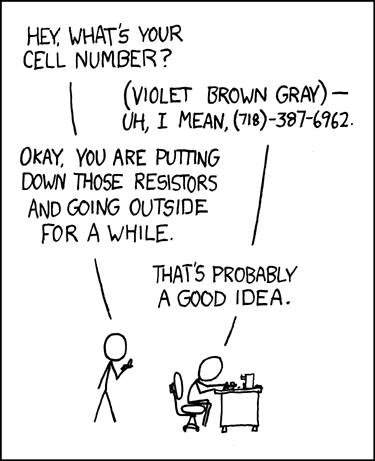
I saw this cartoon and it reminded me of the resistor colour code quiz we made up in class on Friday using Shane’s questions.  Can you remember how to work out the value of each resistor?  Let’s see if you can all do it on your own this time.

You might want your own copy of the resistor colour code chart as you won’t be able to see my classroom poster this time.  You can get a chart online here or as a pdf here.  Click once on each picture in the quiz when you are are ready to see the answer.  Clicking again will move on to the next resistor.  

Don’t click ahead too quickly or you will see the answer before you have worked it out.  

Click here to take the quiz

electronic breadboards September 23, 2008

Posted by mrmackenzie in : Int1 Practical Electronics , add a comment

We discussed laying out of circuits today when I introduced the bicycle lights project we will be working on for your final assessment.  

One of the methods for laying out a circuit is to use a breadboard.  These youtube videos are a good introduction to using breadboards in electronics.  Watch the upper clip first as the lower clip is designed to follow on from this one.  Post a comment if you have any questions and I will try to provide an answer.

Note: we have met the 555 timer chip from the 2nd clip in our computer simulation sessions -- remember the blinking LED exercises? 

(more…)

Soldering electronic components September 23, 2008

Posted by mrmackenzie in : Int1 Practical Electronics , add a comment

We’ve been working with the new soldering irons in class with limited success.  Now that we have solved some of the problems, I’ve also found a few videos that show good soldering technique.  Have a look at the clips below and think about whether you could use some of these tips to improve your own soldering technique.

(more…)